Enterprise Image Content Moderation with Kong AI Gateway and AWS Bedrock Guardrails

As enterprises adopt generative AI, securing multimodal content (text and images) has become necessary. Most organizations have implemented text-based content filtering, but image content moderation often remains an afterthought. This gap creates risk when users can submit images containing inappropriate, harmful, or policy-violating content through AI-powered applications.
In this post, we’ll walk through how to configure Kong AI Gateway’s AI AWS Guardrails plugin (ai-aws-guardrails) to filter image content in real-time.
The Challenge: Multimodal Content Safety
Modern AI applications increasingly accept multimodal inputs. Users can submit images alongside text prompts using the OpenAI Chat Completions API format in two ways:
- Base64-encoded images - The image data is embedded directly in the request
- Image URLs - A reference to an externally hosted image via the
image_urlproperty
Both methods present content moderation challenges. Without proper guardrails, users could submit inappropriate images that bypass text-only content filters.
Architecture Overview
The solution uses these components:
- Kong AI Gateway - Acts as the API gateway, routing requests through a Kong Service and Route to upstream LLMs
- AI Proxy Advanced Plugin (
ai-proxy-advanced) - Handles LLM routing, authentication, and load balancing across model targets - AI AWS Guardrails Plugin (
ai-aws-guardrails) - Intercepts requests and sends content to AWS Bedrock for policy evaluation - AWS Bedrock Guardrails - Evaluates both text and image content against configured content policies using the ApplyGuardrail API
flowchart LR
    A[AI Application]

    subgraph Kong["Kong AI Gateway"]
        C[AI AWS Guardrails Plugin]
        B[AI Proxy Advanced Plugin]
        C -->|"4) If Allowed"| B
    end

    D[AWS Bedrock<br/>ApplyGuardrail API]
    E[Upstream LLM<br/>OpenAI / Anthropic / etc.]

    A -->|"1) Text + Image Request"| C
    C -->|"2) Content Evaluation"| D
    D -->|"3) Allow / Block"| C
    B -->|"5) Forward to LLM"| E
    E -->|"6) LLM Response"| B
    B -->|"7) Response"| A
When an image violates the content policy, Bedrock Guardrails returns an intervention and Kong returns a blocked message to the client. The request never reaches the upstream LLM.
Works with Any LLM Provider
The guardrails operate independently of your upstream LLM. The AI AWS Guardrails plugin evaluates content before it reaches the model, so you can pair Bedrock’s content filtering with any LLM provider that Kong AI Gateway supports:
- OpenAI (GPT-5.2, GPT-5 nano, etc.)
- Anthropic (Claude)
- Google (Gemini)
- Azure OpenAI
- AWS Bedrock models
- Self-hosted models (Llama, Mistral, etc.)
You can standardize on AWS Bedrock Guardrails for content moderation across your AI stack, regardless of which models you’re running. In this post, we use OpenAI (gpt-5-nano) as the upstream provider to show this in practice: the AI AWS Guardrails plugin handles content evaluation while a separate LLM serves the request.
Step 1: Configure AWS Bedrock Guardrails
First, create a guardrail in the AWS Bedrock console with image content filtering enabled. Navigate to Amazon Bedrock → Guardrails → Create guardrail.
Content Filters Configuration
Enable content filters for both text and images across all harmful categories:
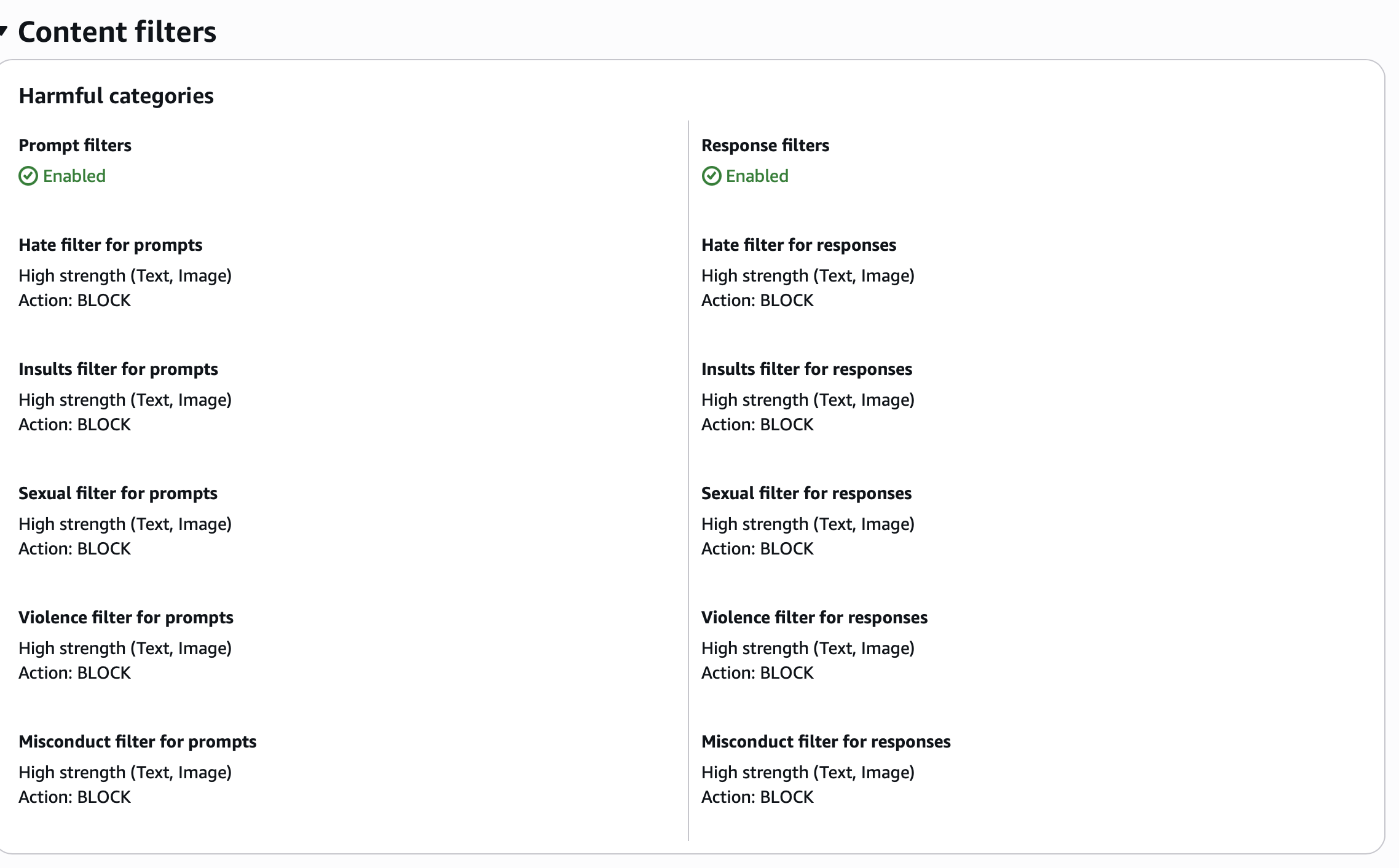
Configure each filter category with the following settings:
| Category | Prompt Filter | Response Filter | Modalities |
|---|---|---|---|
| Hate | High strength, BLOCK | High strength, BLOCK | Text, Image |
| Insults | High strength, BLOCK | High strength, BLOCK | Text, Image |
| Sexual | High strength, BLOCK | High strength, BLOCK | Text, Image |
| Violence | High strength, BLOCK | High strength, BLOCK | Text, Image |
| Misconduct | High strength, BLOCK | High strength, BLOCK | Text, Image |
Blocked Messaging Configuration
Configure the message returned when content is blocked:
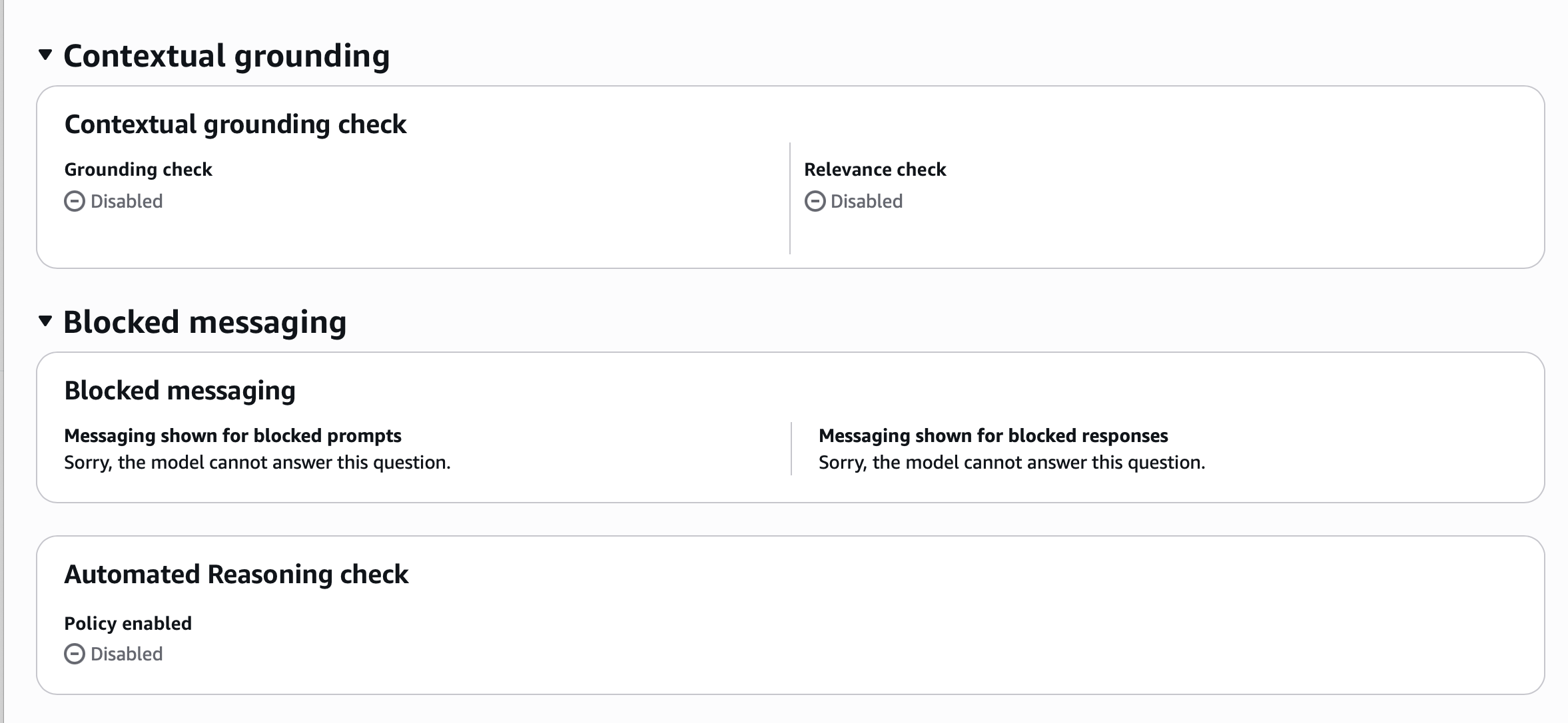
Set both prompt and response blocked messages to something user-friendly:
Sorry, the model cannot answer this question.Regional Availability for Image Filters
Image content filters are generally available in:
- US East (N. Virginia)
- US West (Oregon)
- Europe (Frankfurt)
- Asia Pacific (Tokyo)
Preview availability exists in additional regions with support for Hate, Insults, Sexual, and Violence categories.
Image Limitations
Be aware of the following constraints when using image content filters:
- Supported formats: PNG and JPEG only
- Maximum file size: 4 MB per image
- Maximum dimensions: 8000x8000 pixels
- Maximum images per request: 20 images
- Rate limit: 25 images per second
Step 2: Configure Kong Service, Route, and Plugins
With your Bedrock guardrail created, configure the Kong Service, Route, and plugins. The route attaches two plugins: AI Proxy Advanced for LLM routing and AI AWS Guardrails for content evaluation.
In this example, we use OpenAI (gpt-5-nano) as the upstream LLM provider. This shows that the AI AWS Guardrails plugin works with any LLM, not just AWS Bedrock models.
Plugin configuration
Here’s the full declarative YAML configuration including the Kong Service, Route, and both plugins:
services:
  - name: openai-base-service
    host: localhost
    port: 32000
    protocol: http
    routes:
      - name: openai-base
        paths:
          - /1/chat/completions
        strip_path: true
        plugins:
          - name: ai-proxy-advanced
            config:
              llm_format: openai
              response_streaming: allow
              targets:
                - model:
                    name: gpt-5-nano
                    provider: openai
                  route_type: llm/v1/chat
                  auth:
                    header_name: Authorization
                    header_value: "{vault://env/OPENAI_API_KEY}"
                  logging:
                    log_payloads: true
                    log_statistics: true
                  weight: 100
          - name: ai-aws-guardrails
            config:
              aws_region: us-east-1
              guardrails_id: ve8dowea7ua1
              guardrails_version: "1"
              guarding_mode: INPUT
              text_source: concatenate_all_content
              response_buffer_size: 100
              timeout: 10000
              allow_masking: false
              stop_on_error: false
              aws_access_key_id: "{vault://env/AWS_ACCESS_KEY_ID}"
              aws_secret_access_key: "{vault://env/AWS_SECRET_ACCESS_KEY}"
Both plugins are attached to the same route. The AI AWS Guardrails plugin evaluates content first, and if the request passes, the AI Proxy Advanced plugin forwards it to OpenAI’s gpt-5-nano model. Blocked requests never reach the upstream LLM.
Key Configuration Parameters
| Parameter | Description | Recommended Value |
|---|---|---|
guarding_mode | When to apply guardrails | INPUT for request filtering, OUTPUT for response filtering, BOTH for both |
text_source | How to extract text content | concatenate_all_content includes all message content |
response_buffer_size | Bytes buffered before sending to guardrails | 100 (default) |
timeout | Connection timeout in milliseconds | 10000 |
allow_masking | Mask violations instead of blocking | false for strict enforcement |
Authentication Options
The plugin supports multiple authentication methods:
- Static IAM credentials -
aws_access_key_idandaws_secret_access_key - IAM Role assumption - Configure
aws_assume_role_arnandaws_role_session_name - Environment variables - Falls back to
AWS_ACCESS_KEY_IDandAWS_SECRET_ACCESS_KEY
Kong AI Gateway also supports AWS authentication mechanisms native to each runtime:
- EC2 - Instance profiles with attached IAM roles
- ECS - Task execution roles
- EKS - Pod Identity (recommended for Kubernetes, no plugin auth configuration needed)
For production, use the runtime-native auth mechanism. Pod Identity is a good fit for EKS since the pod inherits AWS permissions automatically without any plugin-level credential configuration.
Step 3: Testing Image Content Filtering
With both components configured, test the integration using curl. The following example sends a base64-encoded image that violates the content policy:
# Set your base64-encoded image content
BAD_BASE64="<your-base64-encoded-image>"

# Build and send the request using jq for proper JSON formatting
jq -n --arg img "$BAD_BASE64" '{
  model: "gpt-5-nano",
  messages: [{
    role: "user",
    content: [
      {type: "text", text: "What is in the image?"},
      {type: "image_url", image_url: {url: "data:image/jpeg;base64,\($img)"}}
    ]
  }]
}' | curl http://localhost:8000/1/chat/completions \
  -H "Content-Type: application/json" \
  -H "Authorization: Bearer $OPENAI_API_KEY" \
  -d @-
When the image content violates the Bedrock Guardrails policy, Kong returns:
{"error":{"message":"Sorry, the model cannot answer this question."}}Testing with Image URLs
The plugin also works with externally hosted images passed via image_url:
curl http://localhost:8000/1/chat/completions \
  -H "Content-Type: application/json" \
  -H "Authorization: Bearer $OPENAI_API_KEY" \
  -d '{
    "model": "gpt-5-nano",
    "messages": [{
      "role": "user",
      "content": [
        {"type": "text", "text": "Describe this image"},
        {"type": "image_url", "image_url": {"url": "https://example.com/image.jpg"}}
      ]
    }]
  }'
Kong handles the conversion between the OpenAI API format and the Bedrock ApplyGuardrail API format, which expects images as base64-encoded bytes in a GuardrailImageBlock structure.
Troubleshooting: Buffer Size for Large Images
When working with base64-encoded images, you may encounter a 400 truncated response error. This occurs because Kong’s default Nginx client body buffer size is too small for large image payloads.
To resolve this, increase the buffer size by setting the following environment variable before starting Kong:
export KONG_NGINX_HTTP_CLIENT_BODY_BUFFER_SIZE=1mThis sets the buffer to 1 megabyte, which accommodates most base64-encoded images. Restart Kong after setting this variable for the change to take effect.
Note that requests using image_url references are not affected by this limitation since the image data isn’t embedded in the request body.
Understanding the Content Flow
Here’s how Kong processes multimodal content:
sequenceDiagram
    autonumber
    participant Client as AI Application
    participant Kong as Kong AI Gateway
    participant Bedrock as AWS Bedrock Guardrails
    participant LLM as Upstream LLM

    Client->>Kong: Chat Completions Request (text + image)
    Note over Kong: Parse request, extract content

    rect rgba(165, 206, 58, 0.15)
        Kong->>Kong: Fetch & convert to base64 (if URL)
    end

    Kong->>Bedrock: ApplyGuardrail API
    Note over Bedrock: Evaluate against policies

    rect rgba(8, 54, 67, 0.15)
        Bedrock-->>Kong: GUARDRAIL_INTERVENED (violation)
        Kong-->>Client: Blocked response
    end

    rect rgba(165, 206, 58, 0.15)
        Bedrock-->>Kong: NONE (allowed)
        Kong->>LLM: Forward request
        LLM-->>Kong: Model response
        Kong-->>Client: Return response
    end
The flow breaks down into these steps:
- Client sends request - OpenAI Chat Completions format with image content (base64 or URL)
- Kong AI Proxy receives request - Parses the message content
- AI AWS Guardrails plugin extracts content - Based on
text_sourceconfiguration - Plugin calls Bedrock ApplyGuardrail API - Sends text and image content for evaluation
- Bedrock evaluates against policies - Content filters check for harmful categories
- Policy decision returned - Either
NONE(allow) orGUARDRAIL_INTERVENED(block) - Kong routes or blocks - Forwards to LLM if allowed, returns blocked message if not
For image URLs, Kong fetches the image and converts it to the base64 format required by the Bedrock ApplyGuardrail API before sending it for evaluation.
AI Semantic Prompt Guard vs. AI AWS Guardrails
Kong offers multiple guardrail plugins. Here’s when to use each:
| Feature | AI Semantic Prompt Guard | AI AWS Guardrails |
|---|---|---|
| Text content filtering | Yes | Yes |
| Image content filtering | No | Yes |
| On-premise deployment | Yes | No (requires AWS) |
| Custom embedding models | Yes | No |
| Managed service | No | Yes |
Use AI AWS Guardrails when you need image content moderation. The AI Semantic Prompt Guard plugin is better suited for text-based analysis and on-premise deployment, while AI AWS Guardrails adds image filtering through AWS’s managed service.
Production Considerations
When deploying this solution in production, consider the following:
Performance
- Image content filtering adds latency to requests (the Bedrock API call)
- Configure appropriate
timeoutvalues based on your SLA requirements - Monitor the
guardrailProcessingLatencymetric in Bedrock responses
Cost
- Bedrock Guardrails charges per policy unit
- Image content uses
contentPolicyImageUnitsseparate from text units - Consider using
guarding_mode: INPUTonly if response filtering isn’t required
Security
- Use IAM role assumption rather than static credentials
- Restrict the IAM role to only
bedrock:ApplyGuardrailpermissions - Enable SSL verification in production (
ssl_verify: true)
Observability
- Kong provides block reason metrics for the AI AWS Guardrails plugin
- Integrate with your SIEM for compliance auditing
- Log guardrail interventions for policy tuning
Conclusion
Securing multimodal AI applications requires content moderation that goes beyond text. By combining Kong AI Gateway with AWS Bedrock Guardrails, you can filter both text and image inputs in real-time.
Takeaways:
- Enable image modalities in your Bedrock Guardrails content filter configuration
- Configure the Kong AI AWS Guardrails plugin with appropriate authentication and guarding modes
- Increase the Nginx buffer size when working with base64-encoded images
- Use AI AWS Guardrails (not AI Semantic Prompt Guard) for image content filtering
This approach adds a content moderation layer at the gateway without requiring changes to your upstream LLM integrations.
How Silex Can Help
As a Kong partner, Silex Data Solutions has experience implementing Kong AI Gateway and enterprise API management. Our AI Foundry practice helps organizations adopt GenAI, covering architecture design, security implementation, and production deployment.
If you’re building AI-powered applications or need help with content moderation and compliance, our team can help.
Contact us to learn how we can help secure your generative AI initiatives.